
Sun Seeker: Sunlight Tracker
ozPDAPhotography
4.555.00 Reviews
- Version
- 5.5.2
- Installs
- 50.00K
- Age Rating
- Everyone
Screenshots
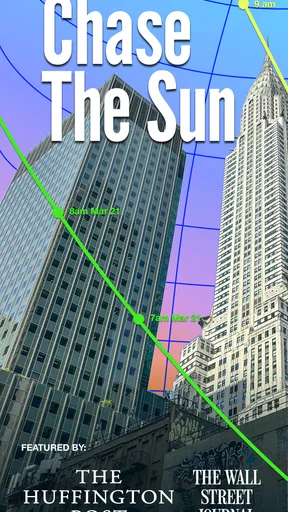
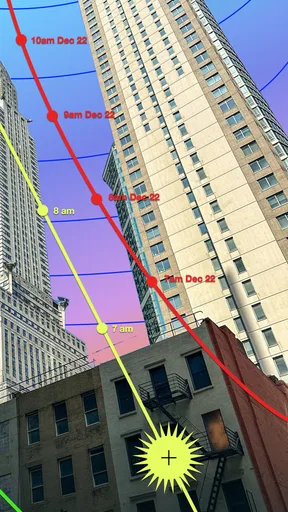
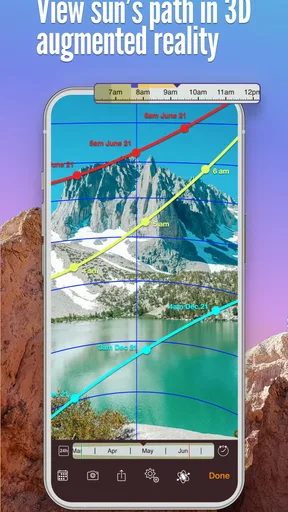
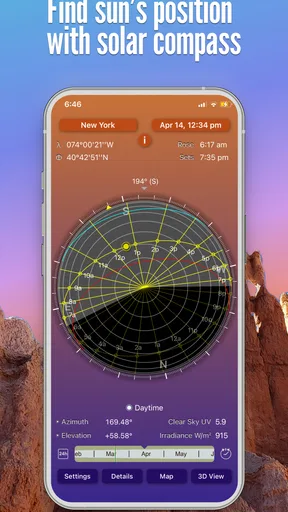
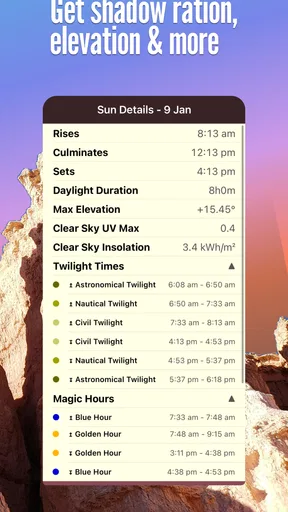
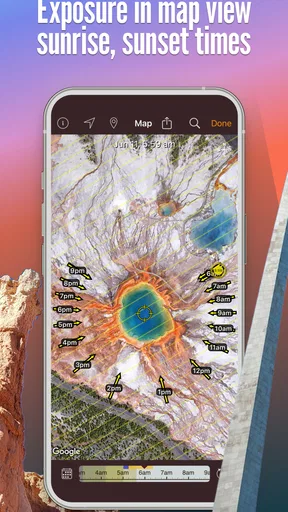
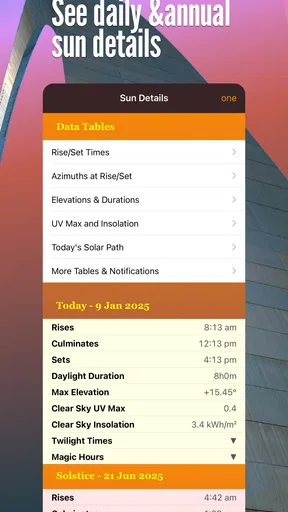

Our Review of Sun Seeker: Sunlight Tracker
 Analysis by Appyee
I trust a sunlight planner most when it helps me understand what I can see, rather than asking me to treat a screen as a substitute for being outdoors. That is the lens I use with Sun Seeker: Sunlight Tracker: its value is in making the sun’s changing position easier to picture, then letting me decide what to do with that information. It is a photography app from ozPDA, and its focus is notably narrower than an all-purpose camera or weather app.
That focus matters if you are deciding whether to pay for a specialist tool. At $6.49, I would want more than a sunrise time I can find in a general-purpose app; the useful distinction here is the combination of a map-like solar path and an AR view. The app is rated 4.5 from around 835 ratings, with over 50,000 installs. Those figures suggest an established audience, but I would still judge it by whether its way of showing the sun fits my own planning habits.
What the screen can—and cannot—settle
The AR display is a visual aid, not a guarantee that a particular beam of sunlight will reach a precise spot. Buildings, trees, terrain, and changing conditions all affect what you actually see. I find it most useful for orientation: it helps me answer “which direction should I look?” and “roughly when will the sun move there?” For a final decision about a shoot or a planting location, I would still check the actual space and its obstructions.
That distinction also helps set expectations about the app’s trustworthiness. A projected path can make planning more intuitive, but it should not be mistaken for a promise about local light quality. I would use it to narrow down a time and viewpoint, then arrive early enough to adjust if the scene does not match the plan.
Choices that affect a field session
The most visible choice is whether to use AR or the flat compass view. AR gives a more immediate sense of direction when I am standing at a location; the flat view is a calmer option when I want to scan the path and its hourly markers without holding the phone up. Switching between them is a practical way to avoid making every check a camera-and-compass exercise.
There is also a real battery trade-off. The original review notes that AR can use a fair bit of power, so I would avoid leaving that view running while I am walking between locations. I would check the path, put the phone away, and bring AR back up only when I need to line up a direction. That small habit is more useful than treating the mode as something to keep open continuously.
Location, orientation, and sensible caution
Sun position is meaningful only in relation to where you are, and a compass-based view is only as helpful as the phone’s orientation. I would make sure the app has the location access needed for the place I am planning around, and I would follow any permission prompt deliberately rather than tapping through it. If I am checking a spot away from my current position, I would confirm that the selected location is the one I intend to plan for before trusting the visual path.
When the compass direction seems off, I would not immediately assume the solar calculation is wrong. Nearby metal, the way the phone is held, or a compass that needs recalibration can make the displayed direction less dependable. Comparing the flat view with visible landmarks, then rechecking while standing clear of likely interference, is a sensible field check. This is a planning aid, not a surveying instrument.
Exploring the Features
Sun Seeker is packed with features that cater to both casual users and professionals. The app uses augmented reality to provide a 3D view of the sun's path, which is super handy if you're outdoors and need to visualize where the sun will be at any given time.
One of my favorite features is the flat compass view. It displays the solar path, its hour intervals, and the winter and summer solstice paths. For those who like things on the go, it's perfect for a quick check without diving into too many details. But when you need the nitty-gritty, the app doesn't shy away from delivering.
Augmented Reality for the Win
The AR feature is where Sun Seeker truly shines. Imagine pointing your phone at the sky and seeing a digital overlay of the sun's trajectory. It's not just a gimmick; this can be incredibly practical. Photographers can plan their shoots to catch the golden hour, while architects can visualize how sunlight will interact with their designs.
Additionally, the AR mode lets you see the position of the sun even when it's obscured by clouds or buildings. This is particularly useful in urban environments where direct sunlight can be a rare commodity.
Practical Applications
Let’s talk about some real-world applications. As someone who dabbles in gardening, knowing the sun's path helps me decide the best spot for my plants. They need the right amount of sunlight, and with Sun Seeker, I can ensure they get it.
For travelers and outdoor enthusiasts, this app can be a game-changer. Planning a hike? Check when the sun rises and sets to ensure you're not caught in the dark. The app also provides magnetic declination, which is essential for accurate compass readings.
User Experience
The user interface is intuitive, although it might take a bit of time to get used to all the features if you're a first-timer. Once you get the hang of it, navigating through different views and modes becomes second nature. The design is sleek and modern, with a pleasant color palette that makes it easy on the eyes.
One thing to note is that while the app is highly functional, it does consume a fair bit of battery, especially when using the AR feature. It’s a small trade-off for such a robust tool, but something to keep in mind if you’re planning a long day out.
Overall Impression
All in all, Sun Seeker: Sunlight Tracker is a versatile app that offers more than meets the eye. Whether you’re a hobbyist or a professional, it provides valuable insights into the sun’s patterns, helping you make the most of natural light.
The app bridges the gap between technology and nature, offering a deeper understanding of the sun's journey across the sky. If you’re someone who loves leveraging technology to enhance your interaction with the world, this app is definitely worth trying.
To sum it up, I find Sun Seeker to be a well-rounded tool that delivers on its promises, helping users harness the power of sunlight in creative and practical ways. Give it a try, and you might just find yourself seeing the world in a whole new light.
A useful routine for planning a shoot
For a practical example, imagine I have a portrait session in a courtyard where I have never worked before. I would check the location and use the flat compass view first to see how the sun’s path crosses the space over the day. That gives me a shortlist of possible times and directions without having to wander around with the phone held up. Once I arrive, I would use AR briefly to relate that path to the walls, trees, and the position where I expect the subject to stand.
I would also make a backup plan rather than building the whole session around a single predicted moment. If the ideal light is blocked by a building, I can still use the path to decide whether to move the subject, change the shooting direction, or return at a different time. This is where the app is more useful than a simple sunrise-and-sunset lookup: it helps me think spatially about a specific location, while leaving the creative choice to me.
Small checks that improve the result
A good workflow is to use the two views for different jobs. I would use the flat compass display for comparing hours and seasonal paths, then switch to AR only when I need to relate those directions to the real scene. The solstice paths are especially useful when a plan is meant for another part of the year: a spot that gets sun in summer may be shaded in winter, so I would avoid treating one visit as a year-round answer.
For gardening, I would treat the display as a way to compare candidate beds, not as a replacement for observing how long each one actually stays lit. A fence or neighboring building may cast a shadow that the broad solar path alone does not fully describe. Checking the same area at different times, and noting the obstructions, turns the app’s directional guidance into a more reliable placement decision.
Where a simpler alternative wins
If I only need to know when the sun rises or sets, a basic weather app or a quick web search is usually faster and less involved. Those options are also better for someone who does not want to learn compass views or use AR. Sun Seeker makes more sense when the question is about direction and timing at a particular spot, rather than just the day’s headline times.
It is also not the right tool for precise navigation or technical surveying. The magnetic declination information is useful context for compass readings, but I would not rely on a phone-based solar display as a substitute for dedicated navigation equipment on a demanding route. Likewise, an architect can use the path to form an early visual impression, but detailed building analysis needs more than a quick AR overlay.
Who is likely to get enough value
I would recommend it most to photographers who regularly scout locations, gardeners comparing sunny and shaded areas, and outdoor planners who want to visualize the sun’s direction rather than memorize it. It can also help travelers decide which side of a viewpoint to visit near sunrise or sunset. Its value grows when I revisit places or plan around a specific time; if I only check solar times once in a while, the paid price may be harder to justify.
The app is suitable for everyone by its age rating, but that does not mean every user needs its specialist approach. Someone who prefers a plain list of times, avoids location-based tools, or rarely plans around natural light may be happier with a simpler alternative. For anyone using it outdoors, I would bring a battery-conscious routine and treat the visual guidance as a planning aid that can be checked against the actual surroundings.
Version and final perspective
The current version is 5.5.2, and the app has been available since February 29, 2012. That long presence and its continued audience make it feel like a focused tool rather than a temporary novelty, though I would still decide based on the way I plan my own photography or outdoor time. The current minimum operating system is 10, so it is worth checking that your device meets that requirement before buying.
My cautious verdict is that this is a worthwhile specialist purchase if seeing the sun’s path in relation to a real place solves a recurring problem for you. I would not buy it just for generic sunrise and sunset times, and I would not treat AR as exact measurement. Used with those limits in mind, it offers a clear, hands-on way to plan around sunlight—and the choice between its visual and flat views makes that planning more flexible than a basic time lookup.
Verdict
Strengths of Sun Seeker: Sunlight Tracker
- Accurate sunlight tracking for any location.
- User-friendly interface with intuitive controls.
- Detailed sun path and elevation charts.
- Augmented reality for real-time sun position.
- Customizable alerts for sunlight changes.
Limitations of Sun Seeker: Sunlight Tracker
- Limited free features, requires in-app purchases.
- Battery consumption can be high on prolonged use.
- Occasional GPS accuracy issues.
- Augmented reality may lag on older devices.
- No offline mode for remote locations.
Similar Picks in This Category
View All
Google Photos
Google LLC4.4

Gallery
Google LLC4.2

Picsart AI Photo Editor, Video
PicsArt, Inc.3.9

B612 AI Photo&Video Editor
SNOW Corporation4.1

BeautyPlus-Selfie Photo Editor
PIXOCIAL TECHNOLOGY (SINGAPORE) PTE. LTD.4.5

Remini - AI Photo Enhancer
Bending Spoons4.1
Frequently Asked Questions
What is Sun Seeker: Sunlight Tracker and how does it work?
Sun Seeker: Sunlight Tracker is an app designed to provide detailed information about the sun's path, including sunrise and sunset times, solar noon, and solar trajectory throughout the day. By using augmented reality and a 3D compass, it allows users to visualize the sun's position at any time and location, making it ideal for photographers, architects, and gardeners.
Is Sun Seeker available for both Android and iOS devices?
Yes, Sun Seeker is available for both Android and iOS platforms. Users can download the app from the Google Play Store for Android devices or the Apple App Store for iOS devices. It offers a seamless experience across both operating systems, ensuring that all users can benefit from its features.
Does Sun Seeker require an internet connection to function?
Sun Seeker does not require an internet connection for its basic functionalities, such as tracking the sun's path and providing solar data. However, for features like updating location data, users might need to connect to the internet. GPS capabilities of the device are utilized to provide accurate location-based solar information.
What are the main features of Sun Seeker?
Sun Seeker offers a range of features, including a 3D compass and augmented reality view for visualizing the sun’s path, detailed information on solar angles, sunrise and sunset times, and solar noon. It also provides data on equinoxes and solstices and has a map view that shows solar direction and elevation at any given time.
Is Sun Seeker user-friendly for beginners?
Yes, Sun Seeker is designed to be user-friendly, with a straightforward interface and clear instructions. Whether you are a professional needing precise solar data or a beginner exploring sunlight patterns, the app provides intuitive tools and visual guides to help users understand and utilize its features effectively.
